Late-night guitar with Bluetooth headphones on.
You want the click in your ears, not in the room. TakeOne keeps the practice quiet while the iPhone mic captures the instrument more naturally.
Bluetooth for listening · iPhone mic for the take
Play along with drums, bass, and pad that follow your song. All on your iPhone, all through your Bluetooth headphones.
 Scan to download
Open TakeOne on the App Store with your iPhone.
Scan to download
Open TakeOne on the App Store with your iPhone.
Designed for iPhone. Available only on the App Store.
TakeOne is for musicians who do not need a production session every time they practice. They need a quick way to hear the count-in, record the room with the iPhone mic, review the current take, save the useful ones, or layer a few tracks when practice needs more context.
You want the click in your ears, not in the room. TakeOne keeps the practice quiet while the iPhone mic captures the instrument more naturally.
You need to hear the pulse, sing the phrase, and know whether this pass is worth keeping. TakeOne turns that into one short loop.
After a real practice round, export the current take as M4A for feedback, save it to your takes library, or open Song Sketch and practice it with a full band behind you.
Bluetooth practice is convenient, but it can blur two jobs that should stay separate: monitoring the click and recording the performance. TakeOne keeps that route visible, then aligns playback and export after calibration.
The raw take keeps its count-in. The playback/export timeline applies the measured offset.
A metronome keeps time but keeps you cold. Drums, bass, and pad can change that. TakeOne builds a practice band around every song you play — verse, chorus, bridge all get their own arrangement. You’re not just practicing with a click, you’re playing with something that sounds back.
Version 1.0 focused on one thing: getting the audio right through Bluetooth. Version 1.6 adds the band — Song Sketch remembers your chords, and drums, bass, and pad play along. The route, calibration, and recording layer hasn’t changed; now there’s something worth playing along with.
Confirm the output you are listening through and the microphone used for the take.
Measure the delay for the current headphones, speaker, AirPlay route, or interface.
Hear the pulse before the take starts, then play through without managing extra tools.
Play it back, export the current M4A, save it to your library, build a three-track Layered Take with Pro, or practice it again with the band arrangement from Song Sketch.
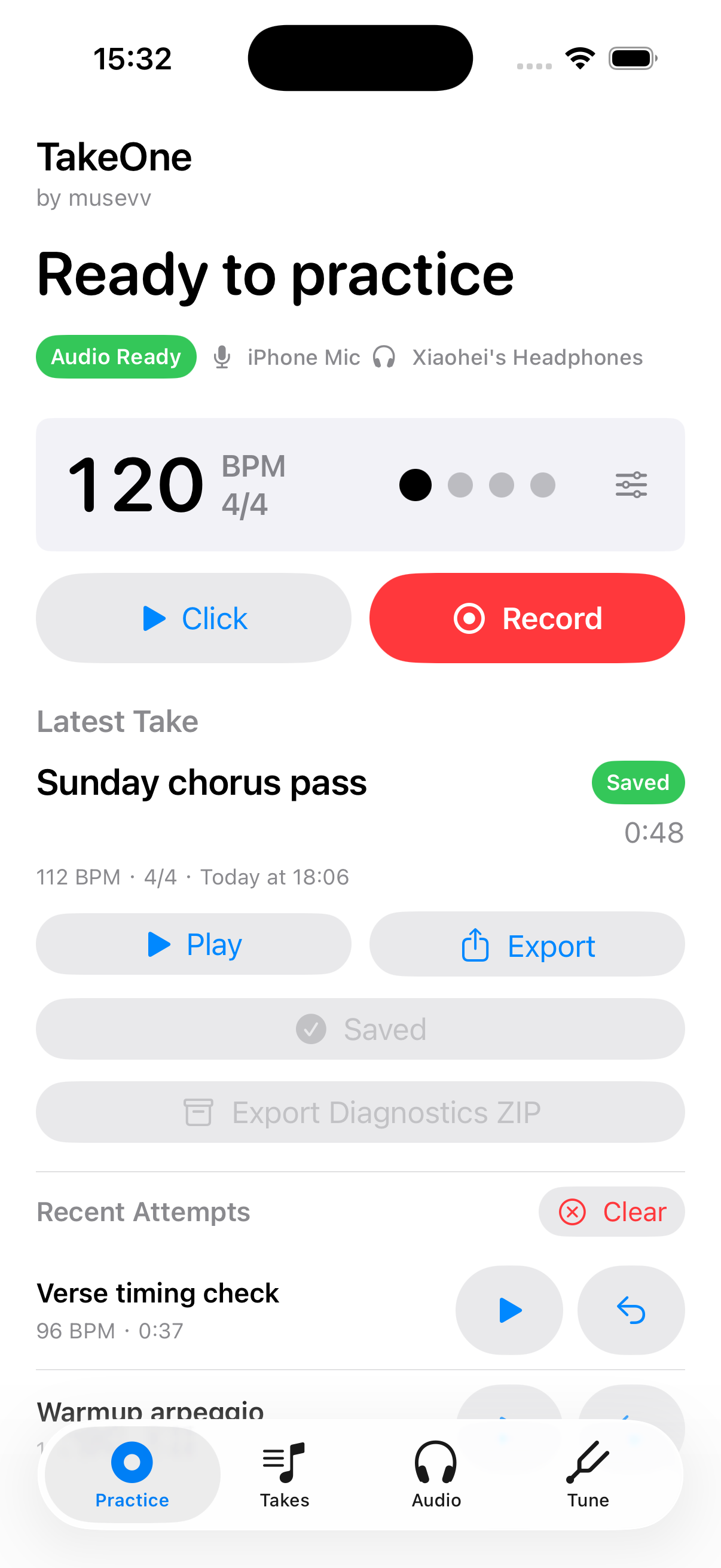
These screens show the current Practice, Audio, Layer, Video, and Takes workflows.
A musical idea hits. Grab your iPhone, put on your Bluetooth headphones, and open TakeOne. Record a rhythm part, layer a lead over it, add a vocal — all in one take session, all perfectly aligned by latency compensation. No laptop. No audio interface. No GarageBand project setup. When you are done, export the mixed result and hear how it all fits together.
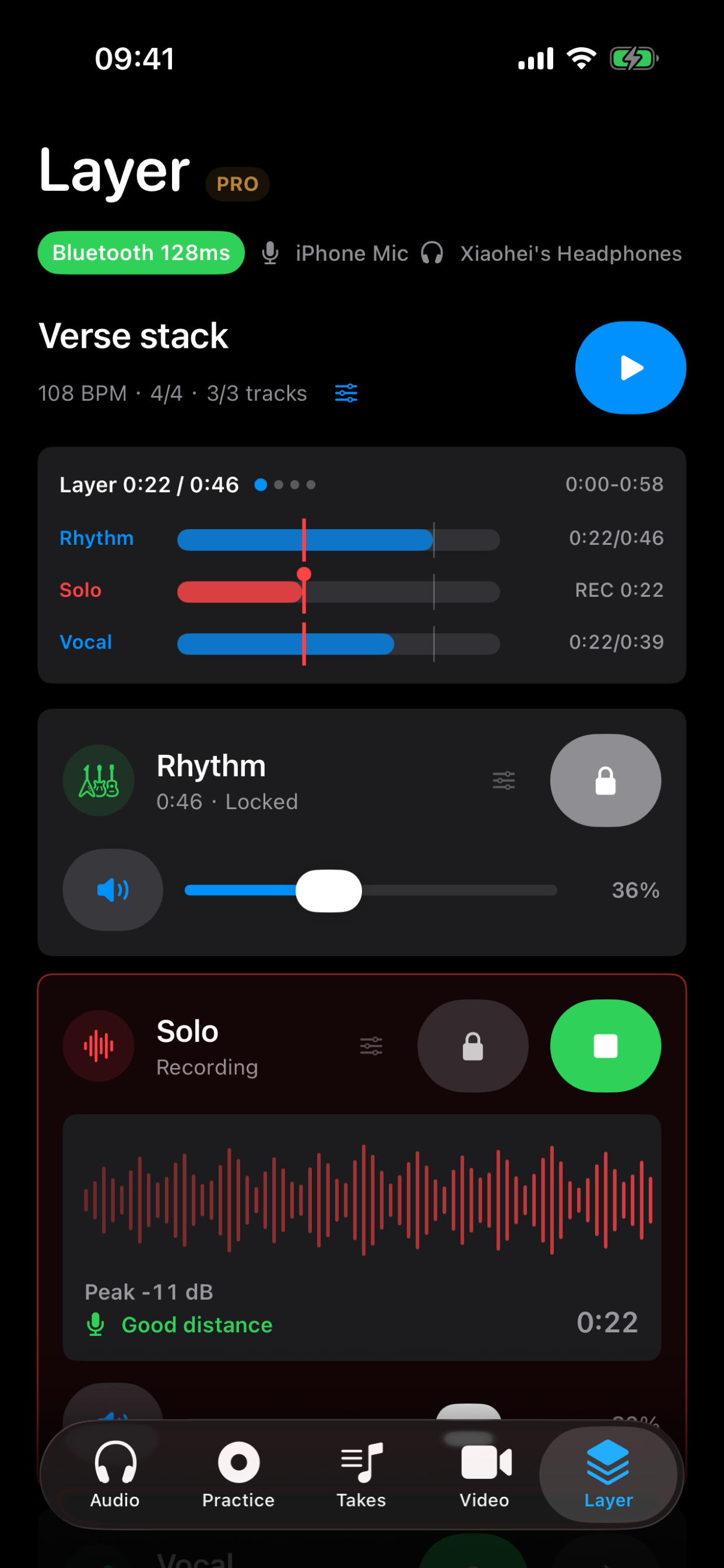
No waiting for a laptop to boot up. No adapter for wired headphones. No DAW project to set up. Just your instrument, your phone, and the idea — captured and mixed in one session.
Read more about the thinking behind Layered Takes:
How I record three guitar parts on my iPhone without opening a DAW
Tell TakeOne what song you’re working on — the chords, the key, the tempo. It builds a custom band around that song. Drums, bass, and pad that change with each section.
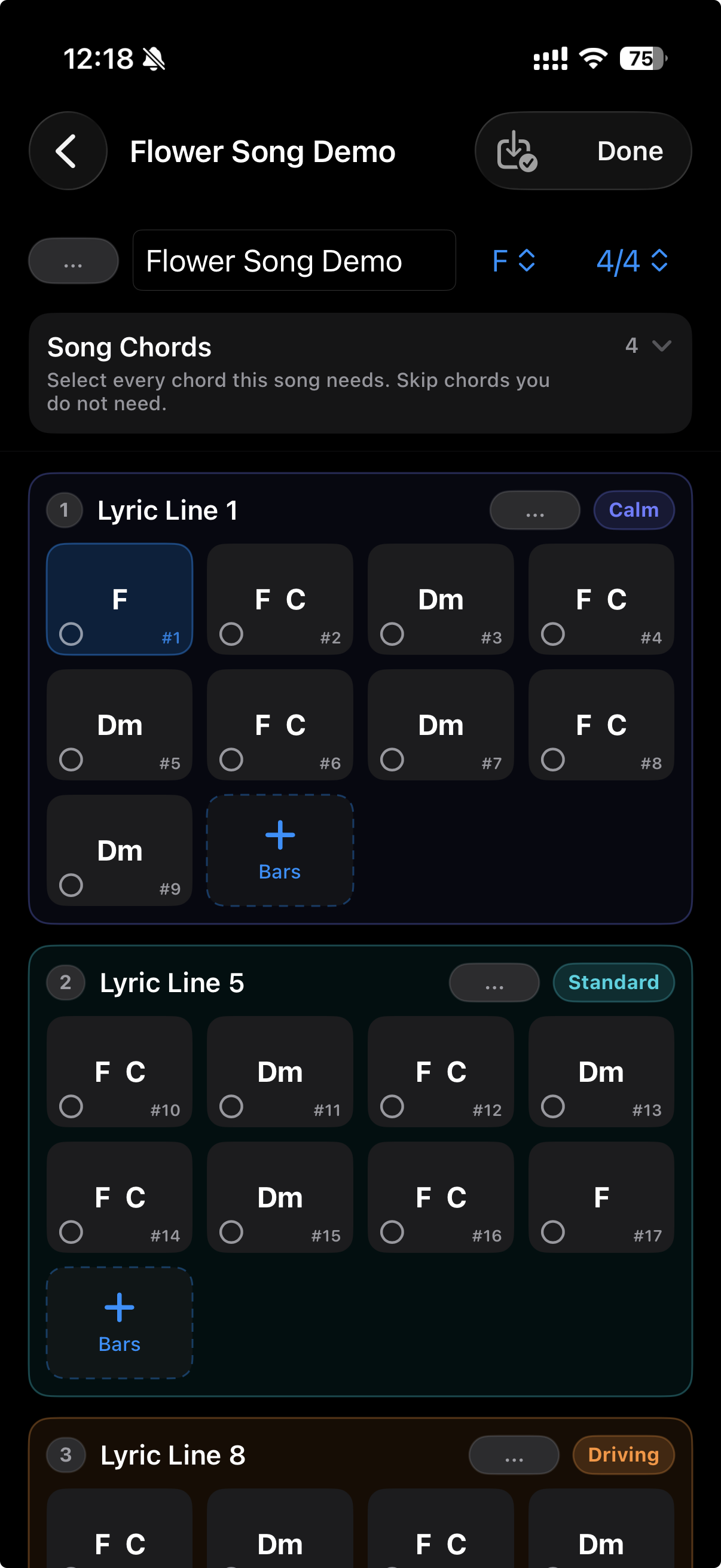
Type in the chords once. TakeOne remembers the key, progression, and structure — one less thing to think about when you sit down to practice.
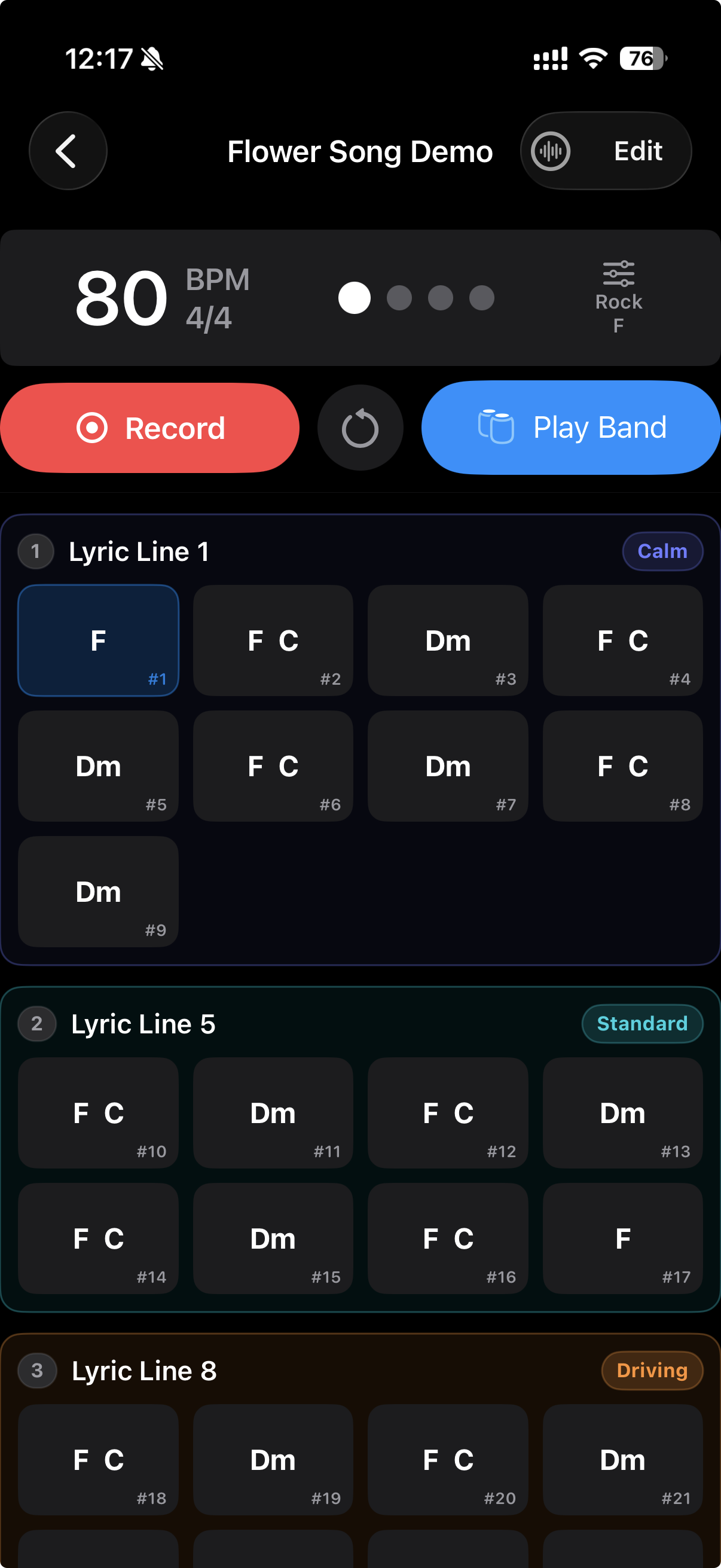
Drums, bass, and pad that play your song. Each section follows the chords you entered — verse, chorus, bridge all sound like the right part.
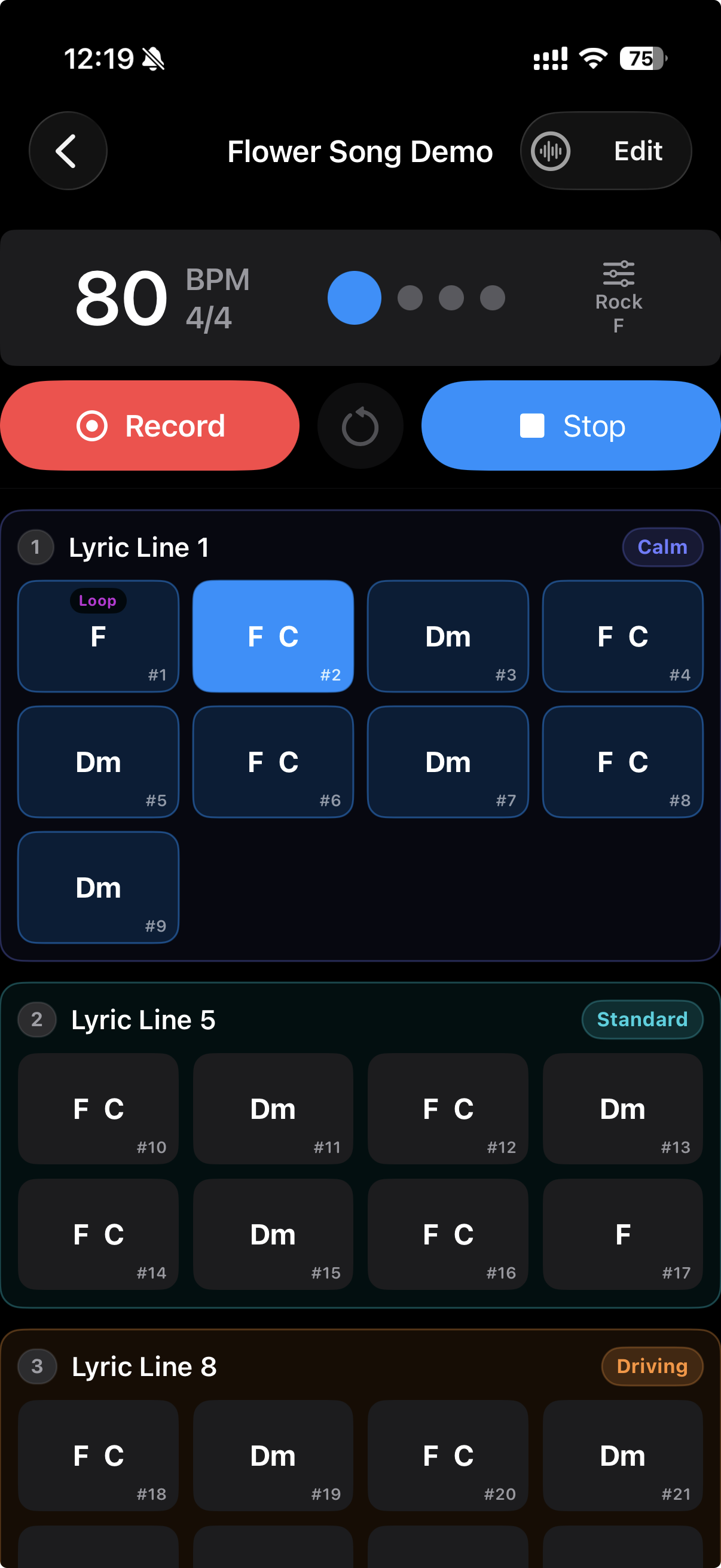
Stuck on a tough section? Loop it. Repeat specific passages until they feel right, while the band keeps time around you.
Read the full story behind Song Sketch and Practice Band:
How I practice guitar with a virtual band on my iPhone
The same recording, with and without TakeOne. The difference is in the alignment — not the performance.
Bluetooth latency pushes your recording out of sync. You can't tell if you're actually improving.
TakeOne compensates in real time. What you hear back is exactly what you played.
Every feature earns its place in the practice room: better input, clearer timing, less setup, and a band that plays along.
Your tuner, metronome, and recorder are usually three separate apps. In TakeOne they share the same timeline — because tuning, setting tempo, recording, and layering was never four jobs. It was one practice session.
Keep listening through your selected output while aiming the recording at the iPhone mic.
Calibrated playback helps you judge the take against the metronome instead of Bluetooth delay.
Count-in, metronome, route check, recording, playback, and export stay in one practice loop.
Drums, bass, and pad that follow your song. Practice with a band, not a metronome — Song Sketch remembers your chords, and the band plays along.
TakeOne is a free iPhone app with an optional one-time Pro purchase. Saving takes and the full takes library are free. No account required, and recordings stay local unless you export or share them.
Musicians who practice with headphones and want a quick way to record, hear, keep, or export one useful take.
No. TakeOne stores recordings locally on your device unless you explicitly export or share a file.
TakeOne measures round-trip Bluetooth latency with sub-5ms precision using an Objective Chirp. All signal processing is on-device — nothing is uploaded to any server.
Use the headphones or speaker you normally practice with, calibrate once, record a 30-60 second take, then play it back or export it.
TakeOne Pro is a one-time purchase that unlocks Songs (the full chord-chart workflow with Practice Band), three-track Layered Takes with mix export, and the Enhancements set — the drum machine, video recording, Clean Export, and Vinyl Video. Saving takes and the full takes library are free for everyone.
No. The product is built for Bluetooth practice pain, but it can also work with speakers, wired routes, or other selected outputs.
Practice Band plays drums, bass, and pad that follow the song you’re working on. Enter the chords once in Song Sketch, and the band follows your tempo and structure. Verse, chorus, bridge each get their own arrangement based on the Energy Map you set.
Just the chords of the song — which you probably already have if you’re practicing from a tab or sheet. Song Sketch lets you type them in, and TakeOne handles the rest: key detection, chord voicing, and automatic arrangement.
Bluetooth headphones add delay to your recordings. Two iPhone apps fix it today — here’s how their approaches differ and which workflow fits yours.
Read the comparisonA technical deep-dive into AVAudioSession routing, the Objective Chirp calibration approach, and the engineering tradeoffs behind latency compensation.
Read the article